




最近、ゲーミングやテクノロジーのコミュニティに少しでも関わったことがある人なら、磁気キーボードに関する話題を耳にしたことがあるでしょう。これらは次なる一大トレンドとして注目されており、タイピングの世界の現王者である従来のメカニカルキーボードの地位を脅かす存在となっています。
しかし、この話題は本物なのでしょうか、それとも巧妙なマーケティングに過ぎないのでしょうか?セットアップのアップグレードを検討しているなら、これら2つのどちらを選ぶかは、専門用語の迷路に迷い込むような気分になるかもしれません。
磁気キーボードとメカニカルキーボードの違いを分かりやすく解説し、どちらがあなたのデスクにふさわしいかを正確に判断できるようにお手伝いします。
1. 核となる違い:動作原理
これらのキーボードがなぜ異なる感触や性能を持つのかを理解するには、その内部(またはキーキャップの下)を見る必要があります。
従来のメカニカルキーボード:物理的接触
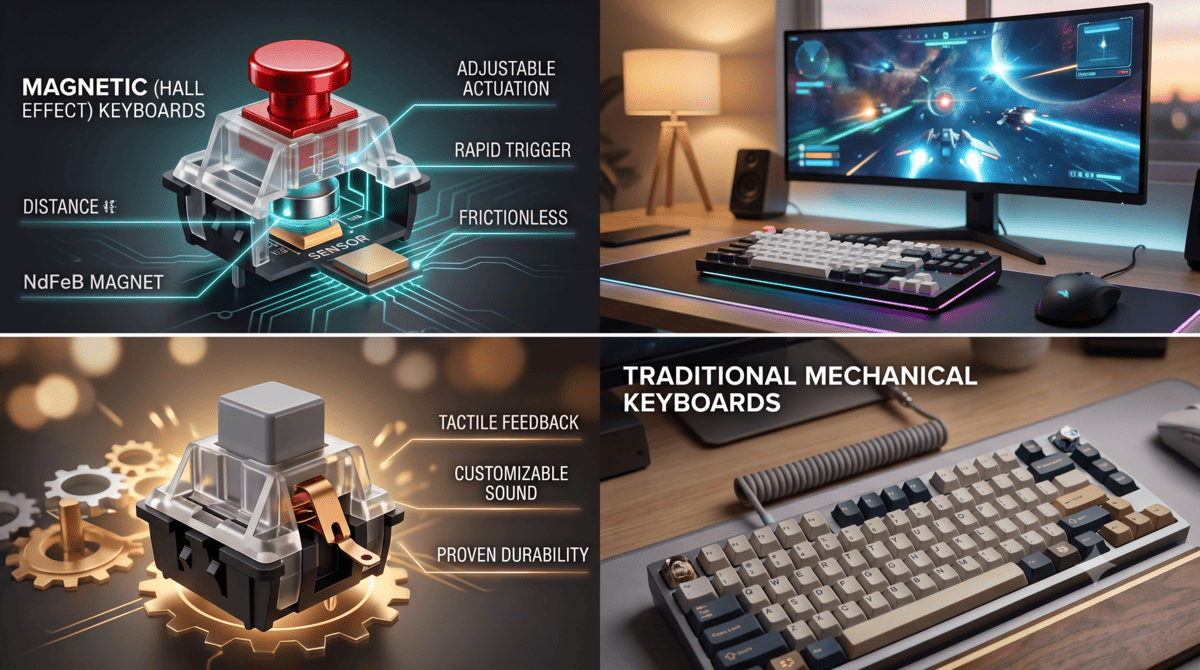
標準的なメカニカルキーボードは物理的な接触に依存しています。キーを押すと、プラスチック製のステムが金属製のリーフスプリングを押し下げます。これらの金属部品が接触すると回路が閉じ、キーボードがキーストロークを認識します。
磁気キーボード:磁石の力
磁気キーボード(しばしばホールエフェクトキーボードと呼ばれます)は、物理的な接触を完全に排除します。代わりに、各スイッチには小さな磁石が内蔵されています。キーを押すと、キーボードのプリント基板(PCB)にあるセンサーが磁場の強さを測定します。磁石がセンサーに十分近づくと、キー入力が認識されます。
2. ラピッドトリガーとカスタマイズ(磁気の利点)
磁気キーボードは、固定された物理的な点に依存するのではなく、キープレスの正確な距離を追跡するため、従来のメカニカルキーボードにはない機能を提供します。
- アクチュエーションの調整可能:キーを認識させるために深く押し込む必要のある深さが気に入らないですか?磁気キーボードなら、ソフトウェアを介してアクチュエーションポイントを変更できます。ゲーミング用に超高感度の0.1mmに設定したり、作業中のタイプミスを防ぐために2.0mmに深く設定したりできます。
- ラピッドトリガー:『Valorant』、『Apex Legends』、『Counter-Strike 2』のようなペースの速いゲームでは、1ミリ秒が重要です。ラピッドトリガーは、キーが少しでも上に戻り始めた瞬間にリセットできるようにします。これにより、従来のメカニカルスイッチを使用している人よりも速くカウンター・ストレイフやキーの連打ができます。
ゲーマー向けの結論:競技性の高い一人称視点シューターをプレイするなら、磁気キーボードは真のハードウェア上の利点をもたらします。
3. タッチ、サウンド、感触(メカニカルの利点)
磁気キーボードが生の速度で優位に立つ一方で、実際のタイピング体験に関しては、メカニカルキーボードがいまだに優勢です。
- スイッチの種類:メカニカルスイッチには主に3つの種類があります。リニア(滑らかで静か)、タクタイル(押したときに満足のいくバンプがある)、そしてクリッキー(大きな音でカチッとした感触)。磁気スイッチはほとんどがリニアであり、これは磁石が距離を正確に読み取るために滑らかな上下の動きを必要とするためです。
- 「ソック」ファクター:カスタムキーボードの音響的な満足感、つまり深くクリーミーな「ソック」音が好きなら、従来のメカニカルキーボードが依然として最高です。カスタマイズ、モディファイ、チューニングのためのオプションがはるかに豊富です。
4. 耐久性とメンテナンス
- メカニカル:物理的な摩擦と金属接点に依存しているため、メカニカルスイッチは最終的に摩耗したり、ほこり、湿気、酸化によって劣化したりします。しかし、ほとんどの高品質メカニカルキーボードはホットスワップ対応のPCBを備えているため、壊れたスイッチを簡単に抜き取り、交換することができます。
- 磁気:物理的な接触がないということは摩擦がないということであり、理論的には磁気スイッチは信じられないほど耐久性があります(しばしば1億回以上のキーストロークに評価されています)。また、ほこりにも非常に強いです。欠点は?PCB上のホールエフェクトセンサーが故障した場合、単純なメカニカルスイッチよりも修理がはるかに困難です。
5. 直接比較:一目でわかる
| 機能 | メカニカルキーボード | 磁気(ホールエフェクト)キーボード |
| 主な用途 | タイピング、日常使い、カジュアルゲーミング | 競技ゲーミング(FPS)、スピード |
| 感触のオプション | リニア、タクタイル、クリッキー | ほとんどがリニアのみ |
| アクチュエーションポイント | 固定(変更不可) | ソフトウェアで調整可能(0.1mm - 4.0mm) |
| 特殊機能 | 無限のカスタムキーキャップ&スイッチオプション | ラピッドトリガー、デュアルアクションキー |
| 価格帯 | 手頃な価格からプレミアムまで | 一般的にプレミアム(150ドル以上) |
どちらを購入すべきか?
適切なキーボードを選ぶことは、あなたが画面の前でどのように時間を使うかによって決まります。
磁気キーボードを選ぶべきなのは、以下の場合です:
- あらゆるパフォーマンス上の優位性を求める競技ゲーマーである場合。
- 超高速キーストロークとカスタムアクチュエーションポイントを試したい場合。
- 純粋に滑らかなリニアタイピング体験を気にしない場合。
メカニカルキーボードを選ぶべきなのは、以下の場合です:
- タイピングの快適さ、感触、音が最優先事項である場合。
- タクタイルまたはクリッキースイッチの物理的なフィードバックを好む場合。
- 手頃な価格のオプションを求めているか、カスタムキーボード構築の趣味を始めたい場合。
まだ迷っていますか?デスクセットアップのアップグレードは個人的な旅です。さらに詳しく知りたい場合は、あなたのデスクセットアップに最適なスイッチタイプを選ぶ方法に関する総合ガイドをご覧ください。次世代のパフォーマンスに切り替える準備ができているなら、最新の高性能ゲーミングキーボードの厳選コレクションを閲覧して、今すぐプレイスタイルを向上させましょう。
どう思いますか?
クラシックなメカニカルの感触を維持しますか、それとも磁石にキーストロークを任せる準備ができていますか?以下のコメントで教えてください!
以下は、Shopifyブログ記事の最後に、最終的な行動喚起の直前に追加する更新されたFAQセクションです。
よくある質問(FAQ)
磁気キーボードはタイピングに適していますか?
はい、タイピングには全く問題ありませんが、メカニカルキーボードとは異なる体験を提供します。磁気スイッチはリニア(最後までスムーズ)であるため、多くのタイピストが触覚フィードバックとして好む物理的な「バンプ」や「クリック」がありません。ただし、ソフトウェアでアクチュエーションの深さを調整して、タイピングをより快適にし、タイプミスを減らすことができます。
磁気キーボードで通常のメカニカルスイッチを使用できますか?
いいえ、できません。磁気キーボードは磁石を含む特定のホールエフェクトスイッチを必要とし、そのPCBは磁場を検出するセンサーで構築されています。従来のメカニカルスイッチは金属製のリーフを使用しており、磁気キーボードでは機能しません。
磁気キーボードはメカニカルキーボードよりも長持ちしますか?
理論的には、はい。磁気スイッチは金属部品間の物理的な接触と摩擦を排除するため、機械的な摩耗が少なくなります。ほとんどの磁気スイッチは1億回以上のキーストロークに評価されており、非常に高い耐久性を誇ります。
カジュアルゲーミングにとってラピッドトリガーは価値がありますか?
主にカジュアルなシングルプレイヤーゲームやRPGをプレイする場合、ラピッドトリガーの恩恵に気づく可能性は低いでしょう。しかし、カウンター・ストレイフ、クイックピーク、または高速なキー入力が重要となる競技性のあるペースの速いゲームをプレイする場合、ラピッドトリガーは顕著な競技上の優位性を提供します。

コメントを書く
このサイトはhCaptchaによって保護されており、hCaptchaプライバシーポリシーおよび利用規約が適用されます。