

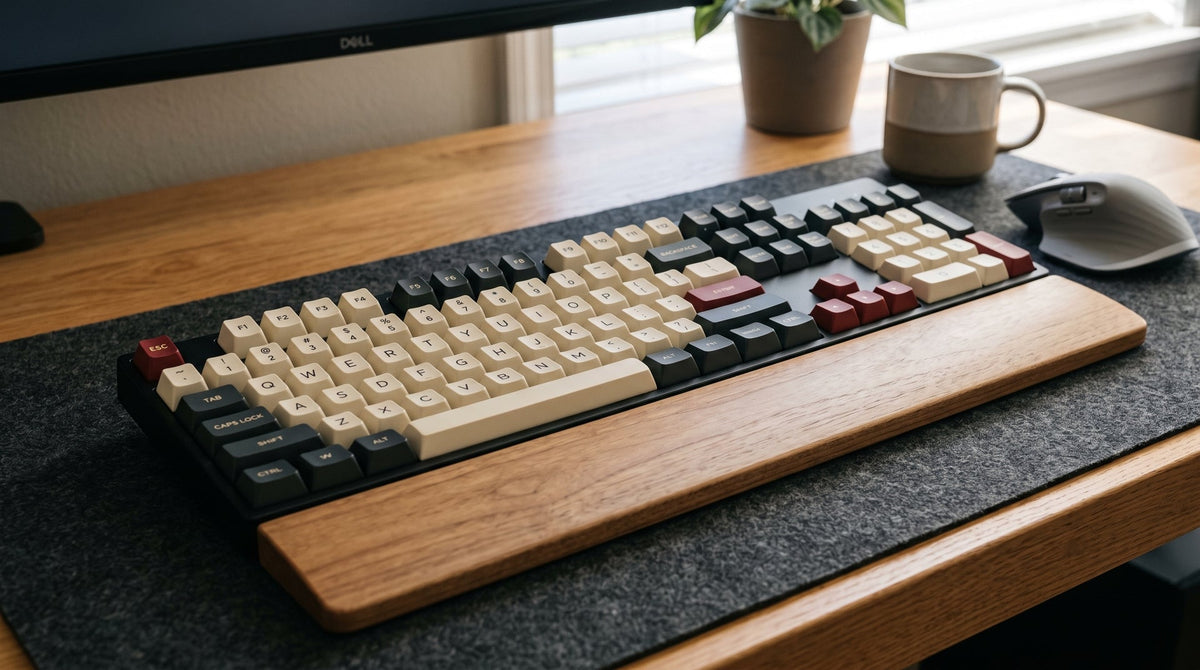
A standard full-size keyboard has 104 keys in the North American (ANSI) layout and 105 keys in the European/International (ISO) layout. Modern mechanical versions often bump this number to 108 keys by adding dedicated media buttons or a quick calculator trigger above the number pad.
If you stumble across vintage terminal boards or legacy IBM Model M units, you might also see 101 or 102 keys. But on modern retail shelves, 104 keys is the baseline definition of a 100% layout.

The Core Difference: ANSI (104) vs. ISO (105)
The one-key difference between American and European keyboards confuses a lot of first-time buyers, especially when shopping for aftermarket keycap sets.
ANSI (US Standard): 104 Keys
[Wide Left Shift] ----------------- [Horizontal Single-Row Enter]

ISO (European/UK):  105 Keys
[Split Left Shift + Extra Key] ---- [Tall Inverted-L Two-Row Enter]
-
ANSI (American National Standards Institute): The standard across the US, Canada, and parts of Asia. It features 104 keys, a wide, single-row rectangular
Enterkey, and a full-length leftShift. -
ISO (International Organization for Standardization): Dominates the UK, Germany, France, and Nordic countries. It packs 105 keys. The
Enterkey is an upside-down "L" spanning two rows, while the leftShiftis sliced in half to make room for an additional key (typically dedicated to backslash\or regional accented characters). - The 108-Key Variant: Look at the top-right corner of modern full-size mechanical boards. Manufacturers often utilize the dead space above the number pad (where lock lights used to sit) to mount 4 extra keys: Volume Up, Volume Down, Mute, and a Calculator or File Explorer shortcut.
Anatomy of a 100% Keyboard: Where Do All 104 Keys Go?
A full-size board is divided into four distinct operational clusters. If you open up any standard 104-key chassis, here is how the physical math breaks down:
| Cluster | Key Count | What It Includes |
| Alphanumeric Zone | 61 keys (ANSI) / 62 keys (ISO) | Letters, numbers 0–9, spacebar, punctuation, and modifiers (Ctrl, Alt, Shift, Caps Lock, Tab). |
| Function Row (F-Row) | 13 keys | Esc plus the complete function line (F1 through F12). |
| Navigation & Arrow Cluster | 13 keys | Dedicated directional arrows (4), navigation block (Insert, Delete, Home, End, Page Up, Page Down), and system commands (Print Screen, Scroll Lock, Pause/Break). |
| Numpad (Tenkey) | 17 keys | Number grid (0–9), decimal point, mathematical operators (+, -, *, /), secondary Enter, and Num Lock. |
| Dedicated Extras (Optional) | 4 keys | Dedicated volume control, mute, or macro shortcuts found on 108-key boards. |
Full-Size vs. Compact Form Factors: What Are You Giving Up?
The mechanical keyboard hobby has spent the last five years obsessing over shaving off desk real estate. Here is how a traditional 100% full-size model measures up against popular compact form factors:
| Form Factor | Typical Key Count | Relative Size | What's Missing? | Ideal Use Case |
| Full Size (100%) | 104 – 108 | 100% (~44 cm wide) | Nothing | Heavy accounting, data entry, CAD work |
| Tenkeyless (TKL / 80%) | 87 – 88 | ~80% (~36 cm wide) | Numpad removed | Balanced work and gaming |
| 75% Compact | 80 – 84 | ~75% (~32 cm wide) | Numpad; navigation block squished into a single column | Minimalist desks, programming |
| 65% Keyboard | 67 – 68 | ~65% (~31 cm wide) | Numpad, F-row gone (accessible via Fn layers) | FPS gaming, compact workspaces |
| 60% Minimalist | 61 – 62 | ~60% (~29 cm wide) | Numpad, F-row, dedicated arrows | Extreme mouse-sweep clearance |
Real-World Desk Realities: The Ergonomic Trade-off
A full-size keyboard measures roughly 44 cm (17.3 inches) wide. While the dedicated numpad feels indispensable if you enter numbers all day, that extra width comes with physical consequences:
-
The Shoulder Flare Problem: To center the alphanumeric home row (
FandJkeys) in front of your chest, a 104-key board forces your mouse hand 15–20 cm further to the right. Over 8 hours of use, holding your right arm externally rotated can strain your shoulder capsule and trapezoids. - The "Mouse Smack" in Competitive Gaming: If you play low-DPI shooters (Valorant, CS2, Apex Legends) on an average 80 cm wide desk pad, wide flick shots will inevitably cause your mouse shell to slam into the side of the number pad.
Who Genuinely Needs a 104/108-Key Board?
- Financial Analysts & Accountants: Muscle-memorized tenkey calculation is three times faster than hunting across the top number row.
-
3D Artists & Blender Users: Blender relies heavily on physical numpad keys (
1,3,7,0) for switching viewport camera angles. Emulating the numpad through layer toggles works, but it breaks fluid modeling flow. - Sim Racers & Flight Sim Enthusiasts: Extra peripheral keys are prime real estate for assigning engine toggles, flap adjustments, and radio channels without opening submenus.
Smart Alternatives: What If You Need the Keys, But Want Desk Space?
If you are torn between the sheer convenience of a 104-key layout and the ergonomics of a smaller keyboard, you don't have to compromise completely:
- Pair a TKL/75% Board with a Standalone Numpad: Keep a matching mechanical numpad parked to the side (or even in a drawer). Pull it out during tax season or end-of-month reporting, and stow it away when you need mouse room.
- Look at Southpaw Boards: A "Southpaw" keyboard flips the script by placing the 17-key numpad on the left side of the board. This keeps your right-hand mouse centered close to the home row while allowing your left hand to tap numerical values without taking your hand off the mouse.
- Upgrade Your Desk Mat and Rest: If you are committed to a full-size deck, pair it with an extended desk mat (at least 900x400 mm) so both your board and mouse have plenty of runway, alongside a dedicated ergonomic padded wrist rest to ease forearm fatigue.
Ready to Upgrade Your Daily Typing Experience?
Whether you are crunching spreadsheets in an enterprise office or building out a clean battlestation, getting the right switch feel and build quality matters just as much as the key count.
Explore our collection of premium hot-swappable mechanical keyboards featuring factory-lubed switches, acoustic dampening foam, and solid aluminum plates. Need to refresh your current full-size board? Check out our double-shot custom ceramic keycap sets designed with full ANSI and ISO compatibility out of the box.

댓글 남기기
이 사이트는 hCaptcha에 의해 보호되며, hCaptcha의 개인 정보 보호 정책 과 서비스 약관 이 적용됩니다.