

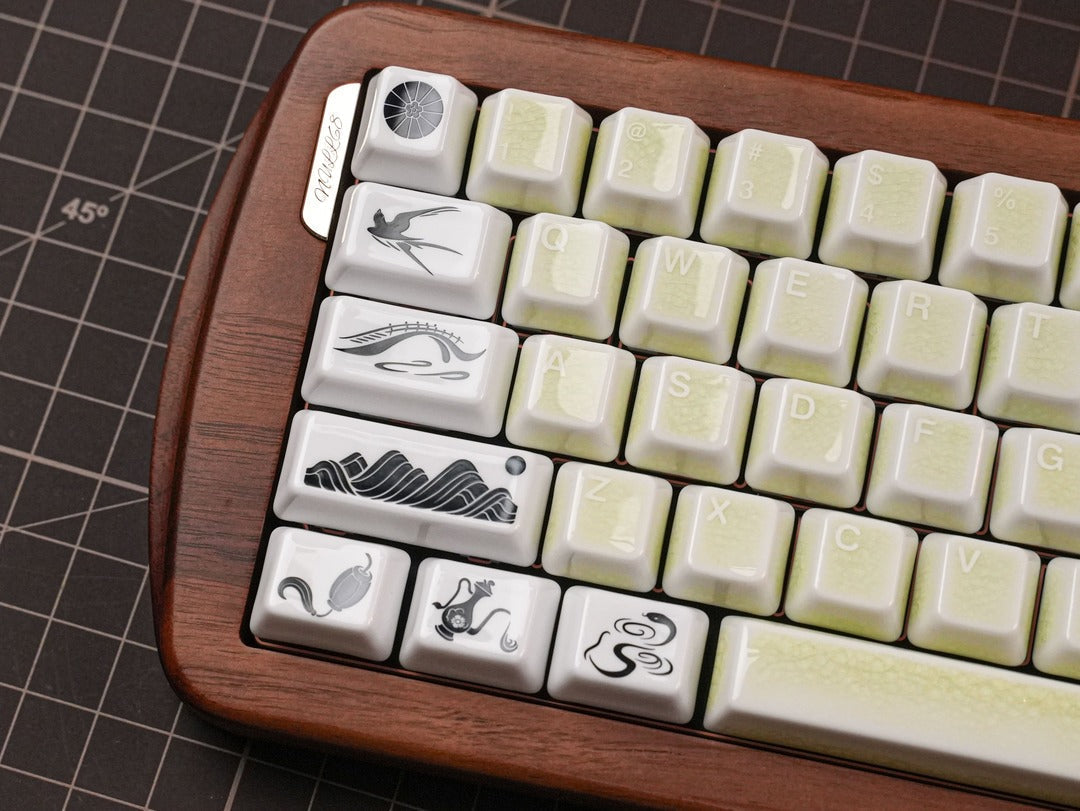
레딧이나 인스타그램에서 키보드 사진을 본 적 있으시죠? 단순한 도구가 아니라 예술 작품처럼 보이는 키보드 말이에요. 그 비결은 대개 200달러짜리 키보드 하나에 있는 게 아니라, "리믹스"라는 예술적인 감각에 있는 거죠.
즐겨 쓰는 PBT 키캡 세트에 세라믹 키캡 의 고급스러운 "탁"한 타격감을 더하고 싶거나, 서로 다른 두 가지 색상의 키캡을 조합하고 싶을 때 항상 드는 질문은 바로 " 서로 다른 키캡 세트를 섞어서 사용할 수 있을까?"입니다.
간단히 말하면, 네 . 좀 더 자세히 설명하자면? 키보드 키 조합은 물리, 인체공학, 그리고 미학이 어우러진 복잡한 문제입니다. 타자감을 해치지 않고 전문가처럼 키캡을 조합하는 데 필요한 모든 정보를 알려드리겠습니다.
1. 황금률: 프로필을 존중하라
초보자들이 가장 흔히 저지르는 실수는 서로 다른 프로파일의 키캡을 혼용하는 것입니다. OEM 프로파일 키캡과 체리 프로파일 키캡을 함께 사용하면 마치 울퉁불퉁한 계단을 오르는 것처럼 손가락이 불편해질 수 있습니다.
- 체리 스위치와 OEM 스위치: 둘은 비슷하게 생겼지만, OEM 스위치가 약간 더 높습니다. 같은 줄에 두 종류의 스위치를 혼용하면 오작동이 발생할 수 있습니다.
- 균일한 프로필(DSA/XDA): 모든 행이 평평합니다. 시각적으로 서로 섞기 가장 쉽지만, SA나 체리처럼 입체적인 프로필과 섞으면 부자연스럽게 느껴집니다.
- 전문가 팁: 최적의 인체공학적 사용을 위해 키보드마다 하나의 프로파일만 사용하세요. 표준 Cherry 프로파일을 사용하는 Cerakey를 사용하는 경우, 원활한 전환을 위해 "파트너" 세트도 Cherry와 호환되는지 확인하십시오.
2. 재료 혼합: 세라믹과 PBT/ABS의 만남
다양한 소재를 섞는 것이 바로 마법과 같은 효과를 만들어내는 핵심입니다. 특히 세라키(Cerakey)의 스플릿 세트를 사용할 때는 더욱 그렇습니다. 플라스틱 보드에 세라믹 소재를 더하면 보드의 물리적 특성이 완전히 달라집니다.
가중치 요소
세라믹은 플라스틱보다 무게가 더 나갑니다. 플라스틱 스페이스바를 세라믹 스페이스바로 교체하면 스위치 내부 스프링이 더 무거운 무게를 지탱해야 하므로 키를 누를 때 약간 뻑뻑한 느낌이 들 수 있습니다.
- 해결 방법: 가벼운 리니어 스위치에 무거운 세라믹 키캡을 사용하는 경우, 해당 스위치를 약간 더 무거운 스프링(예: 45g에서 60g으로)이 장착된 스위치로 교체하여 경쾌한 키감을 유지하는 것을 고려해 보세요.
어쿠스틱 리믹스
키보드 소재를 혼합해서 사용하는 가장 멋진 이유 중 하나는 바로 소리입니다. 세라믹은 PBT보다 더 깊고 깨끗한 "탁" 소리를 냅니다. 알파벳 (문자)에는 세라믹을, 키패드 (Shift, Ctrl, Alt)에는 PBT를 사용하면, 주요 타이핑 영역에서 고급스러운 소리를 경험할 수 있습니다.
3. 전문적인 이미지를 위한 심미적 전략
아무렇게나 대문자를 막 붙이지 마세요. 검증된 다음 세 가지 레이아웃을 활용해 보세요.
| 스타일 | 어떻게 할까요? | 작동 원리 |
| "액센트" 스타일 | 중립적인 PBT 키캡 세트(회색/검정)를 사용하고 Enter, Escape 및 화살표 키캡을 크레이즈드 세라믹 키캡 으로 교체하십시오. | 높은 가격표 없이도 고급스러운 느낌을 더해줍니다. |
| 알파모드 분할 | 알파벳 키에는 세라키(Cerakey)를 사용하고, 바깥쪽 키에는 고품질 PBT 키캡 세트를 사용하십시오. | 가장 많이 손이 닿는 부분에서는 세라믹 특유의 감촉을 느낄 수 있고, 모드 기기에서는 무게를 줄였습니다. |
| 그라디언트 | 같은 재질의 두 가지 색상(예: 흰색과 파란색 세라믹)을 섞어 "폭포" 효과를 낼 수 있습니다. | 카메라에 잘 나오는 세련되고 맞춤 제작된 듯한 모습을 연출합니다. |
4. 기술 점검 목록: 절대 건너뛰지 마세요!
추가 세트를 구매하기 전에 다음 세 가지 사항을 확인하세요.
- 스템 호환성: 두 세트 모두 MX 스타일 크로스 스템을 사용하는지 확인하십시오. (모든 세라키는 견고한 결합을 위해 강화 플라스틱 스템을 사용합니다.)
- Shift 키 크기: 유럽식(ISO)과 미국식(ANSI) 키보드 레이아웃은 Shift 키와 Enter 키의 크기가 다릅니다. 사용하시는 키보드의 "단위"(1.75u, 2.25u 등)를 다시 한번 확인해 주세요.
- 북쪽 방향 간섭: 키보드의 LED가 북쪽을 향하고 있는 경우, 일부 두꺼운 체리 프로파일 키캡이 스위치 하우징에 닿을 수 있습니다.
결론: 섞어도 괜찮을까요?
물론이죠. 키캡을 섞어 쓰는 건 기본 키캡에서 벗어나 커스텀 키캡으로 넘어가는 가장 빠른 방법입니다. 세라키 세라믹 키캡 의 장인정신이 깃든 느낌과 좋아하는 플라스틱 키캡 세트를 조합하면 최고의 촉감과 무궁무진한 시각적 가능성을 모두 누릴 수 있습니다.
나만의 리믹스를 시작할 준비가 되셨나요? Cerakey Split Sets를 둘러보시고 현재 세팅에 딱 맞는 세라믹 액센트를 찾아보세요.
FAQ: 키캡 조합 가이드
Q1: 다른 브랜드나 세트의 키캡을 섞어서 사용할 수 있나요?
답: 물론입니다! 키캡을 조합하는 것은 기계식 키보드를 개인화하는 가장 좋은 방법 중 하나입니다. 하지만 원활한 타이핑 경험을 위해서는 키캡 프로필 (예: Cherry, OEM, XDA)에 주의해야 합니다. 같은 줄에 서로 다른 프로필의 키캡을 사용하면 표면이 고르지 않아 오타나 불편함을 유발할 수 있습니다.
Q2: 키캡을 섞어서 사용하기 전에 가장 중요하게 확인해야 할 사항은 무엇인가요?
답변: "황금률"은 키캡 프로파일을 준수하는 것입니다. 예를 들어, Cerakey (표준 Cherry 프로파일 사용)를 사용하는 경우 다른 Cherry 프로파일 키캡 세트와 함께 사용하는 것이 좋습니다. 이렇게 하면 손가락이 키 위를 부드럽게 움직여 "울퉁불퉁한 계단"에 걸리는 것을 방지할 수 있습니다. 또한 모든 키캡이 MX 스타일 스템 과 호환되는지 확인하십시오.
Q3: 세라믹 키캡과 PBT/ABS 플라스틱 키캡을 혼용하면 키보드 키감이 달라질까요?
답: 네, 그렇습니다. 세라믹은 플라스틱보다 밀도가 높고 무겁습니다. 플라스틱 스페이스바를 세라믹 스페이스바로 바꾸면 키를 누를 때 좀 더 푹신한 느낌을 받을 수 있습니다.
-
팁: 무거운 세라믹 키캡이 너무 느리게 느껴진다면, 해당 스위치를 약간 더 무거운 스프링(예: 45g에서 60g으로 업그레이드)이 장착된 스위치로 교체하여 경쾌하고 촉각적인 반응을 유지하는 것을 고려해 보세요.
질문 4: 재료를 혼합하면 키보드 소리에 어떤 영향을 미치나요?
답변: 바로 여기서 마법이 일어납니다! 다양한 소재를 혼합하여 독특한 "어쿠스틱 리믹스"를 만들어냅니다. 세라믹 키캡은 PBT의 고음역대 소리와는 달리 더 깊고 깨끗한 "탁" 소리를 냅니다. 많은 키보드 애호가들이 주로 타이핑하는 "알파벳" 키에는 세라믹 키캡을 사용하여 고급스러운 소리를 얻고, "수정자" 키(Shift, Alt, Ctrl)에는 PBT 키캡을 사용합니다.
Q5: 믹스 앤 매치하기 좋은 인기 스타일은 무엇인가요?
답변: 고전적인 전략은 세 가지가 있습니다.
-
포인트 스타일: 기본 색상은 무난하게 유지하고, Escape, Enter, Arrow 키를 세라믹 소재로 교체하여 고급스러운 느낌을 더하세요.
-
알파모드 스플릿: 무게와 인체공학적 균형을 맞추기 위해 주요 타이핑 영역(문자)에는 세라믹을, 바깥쪽 키에는 플라스틱을 사용했습니다.
-
그라데이션: 동일한 소재의 서로 다른 두 가지 색상을 조합하여 세련된 "폭포" 또는 그러데이션 효과를 연출합니다.


댓글 남기기
이 사이트는 hCaptcha에 의해 보호되며, hCaptcha의 개인 정보 보호 정책 과 서비스 약관 이 적용됩니다.