



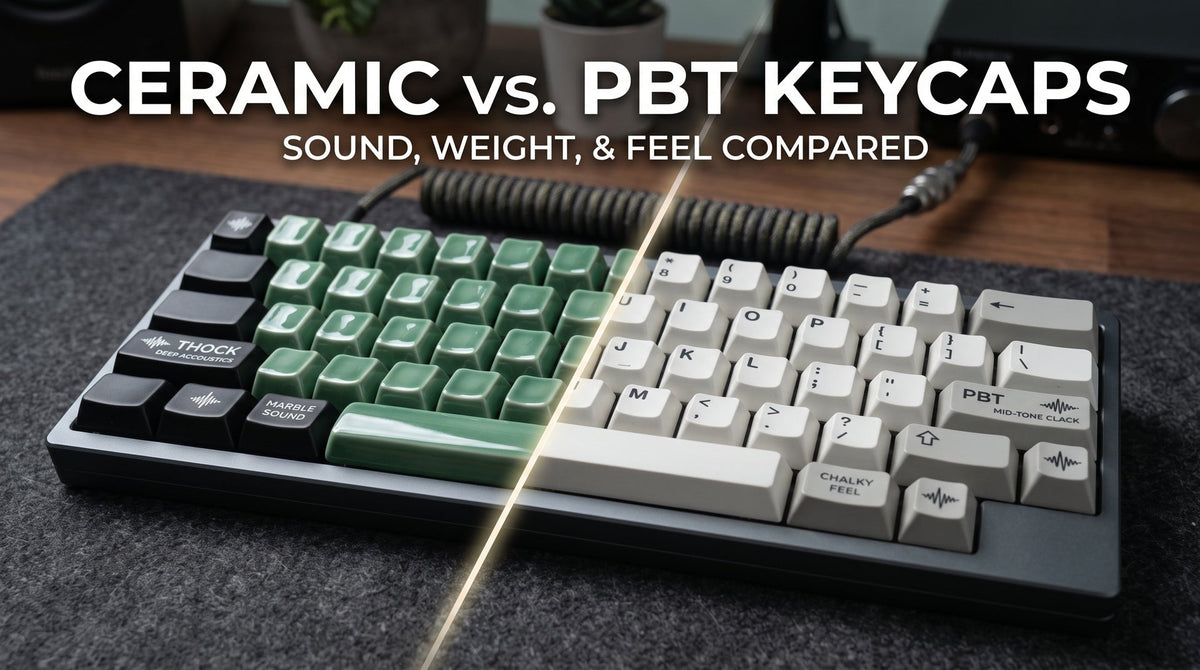
For years, thick-walled PBT (Polybutylene Terephthalate) has stood as the gold standard in the mechanical keyboard community. Prized for its chalky texture, resistance to oil shine, and solid acoustic bottom-out, PBT earned its place as the default upgrade over cheap ABS plastic.
However, the rise of industrial-grade ceramic keycaps has introduced a radically different material profile to desk setups worldwide. Moving from engineered plastics to kiln-fired ceramic transforms everything: bottom-out acoustics, switch resistance, and tactile heat dissipation.
If you are deciding between a premium PBT set and upgrading to ceramic, here is an objective, hands-on breakdown of how these two materials compare across sound, physics, and daily typing feel.
At a Glance: Ceramic vs. PBT Keycaps
| Specification / Feature | Premium PBT Keycaps | Kiln-Fired Ceramic Keycaps |
| Material Density | ~1.3 – 1.4 g/cm³ | ~2.4 – 3.0 g/cm³ |
| Average 1U Weight | 0.8g – 1.1g | ~3.5g |
| Acoustic Signature | Mid-to-low pitch solid thock / clack | Deep, resonant "marble" thock (<1kHz) |
| High-Frequency Ping Damping | Moderate | Superior (Mass filters out case/switch ping) |
| Surface Temperature | Neutral room temperature | Cool-to-the-touch (conducts skin heat) |
| Texture Options | Dry, chalky matte micro-texture | Glossy glazed or silky-smooth matte glaze |
| Oil & Shine Resistance | High (Develops shine after years of use) | Permanent (Glaze is completely impervious to skin oils) |
| Ideal Switch Spring Weight | Any (35g – 65g+) | 45g – 55g+ (Requires snappy return spring) |
1. Acoustic Physics: Deep Marble "Thock" vs. Textured Clack
Sound is simply vibration traveling through material. When you bottom out a switch, kinetic energy shoots through the stem, into the keycap walls, and resonates inside the cap cavity.
PBT Keycaps: Dry, Grounded Acoustics
Thick-walled PBT keycaps dampen higher-frequency noise far better than thin ABS. However, PBT is still a thermoplastic polymer with relatively low physical mass. When bottoming out aggressively, it vibrates rapidly, producing a familiar, crisp "clack" or a moderately dry "thock." On stiff aluminum plates, PBT can still allow high-frequency switch clatter and spring ping to ring through.
Ceramic Keycaps: The Marble Sound Signature
Ceramic possesses more than double the material density of PBT. In acoustic physics, higher mass and structural rigidity act as natural acoustic filters. Ceramic absorbs and deadens high-frequency chatter (the piercing 2kHz–5kHz band), allowing only ultra-low resonant frequencies through.
The resulting sound is not a hollow plastic tap, but a clean, heavy acoustic note often compared to the click of billiard balls or polished mahjong tiles. If you are tuning a keyboard to eliminate high-pitched plastic resonance, switching from PBT to ceramic is the single most dramatic acoustic change you can make without opening your board to mod switch housings.
Sound Test Comparison:
2. Kinetic Momentum: How Mass Changes Switch Travel
The most overlooked difference between PBT and ceramic is physical mass.
A standard 1U PBT keycap weighs roughly 0.9 to 1.1 grams. A 1U Cerakey ceramic keycap weighs approximately 3.5 grams—more than three times heavier. That extra mass directly impacts how your mechanical or magnetic switches actuate and return.
The Downstroke (Inertia Assist)
The added weight gives each keystroke natural downward momentum. The keypress feels remarkably frictionless and fluid, softening the initial tactile resistance and making linear switches feel noticeably smoother. For marathon typing sessions, this downward momentum encourages a relaxed, low-strain stroke.
The Upstroke & Switch Pairing
Because ceramic keycaps carry more mass, your switch spring must work harder to push the key back up to its reset point.
- Ultra-light switches (30g–37g): Not recommended. The return may feel sluggish, especially on stabilized modifier keys like the Spacebar, Enter, and Shift.
- Optimal pairing (45g–55g+ bottom-out): Standard linear switches, magnetic Hall-Effect switches, or crisp tactile switches provide the snappy, immediate rebound needed to complement the keycap's weight.
3. Surface Feel and Thermal Dissipation
The sensory difference between PBT and ceramic goes beyond weight—it changes the moment your fingertips touch the keys.
PBT: Dry Chalky Texture
PBT is renowned for its signature dry, chalky micro-texture. This textured finish provides excellent grip and keeps your fingers from feeling greasy during high-stakes gaming or intense work sprints. However, over extensive daily use, even high-end PBT keycaps will eventually smooth out and show subtle shine on heavily used keys like WASD or the Spacebar.
Ceramic: Cool Touch & Permanent Glazes
Ceramic is a natural thermal conductor. Unlike plastics that trap heat under your fingertips, ceramic immediately draws heat away from your skin, staying refreshingly cool to the touch.
Furthermore, kiln-fired ceramic finishes do not wear away like painted or raw plastic:
- Glossy Glazed Ceramic: Provides a glass-smooth surface with exceptional fingertip traction, locking your hands into position with a distinct high-end porcelain aesthetic.
-
Matte Glazed Ceramic: Delivers a silky, polished stone finish that lets fingers glide smoothly across alphas while retaining precise tactile feedback.
- Zero-Shine Durability: Because the colored glaze is vitrified at temperatures exceeding 1,100°C, skin acids and oils cannot degrade the material. Ceramic keycaps will never develop the worn, greasy shine spots that eventually affect all plastic caps.
4. How to Optimize Your Keyboard Build for Ceramic
If you are upgrading from PBT to ceramic, tuning the rest of your board ensures you get the deepest acoustic profile without excess impact fatigue:
- Plate Choice: Pair ceramic keycaps with non-metallic, flexible plate materials such as FR4, POM, or Polycarbonate (PC). These materials absorb vibration and complement the density of ceramic, whereas stiff brass or thick steel plates can make bottoming out feel overly rigid.
- Gasket Mounting: A gasket-mounted enclosure (such as the Cerakey PEAK 60) isolates typing vibrations from your desk, maximizing the clean, low-pitched acoustic resonance of the ceramic shells.
- Desk Mat Dampening: Always use a 4mm+ cloth or wool felt desk mat. Ceramic creates substantial low-end sound energy; a dense desk mat stops that acoustic energy from bouncing back off your desk surface.
Final Verdict: Which Keycap Material Belongs on Your Board?
Choose PBT Keycaps if:
- You prefer an ultra-lightweight keypress and want to use featherweight switches (under 40g).
- You love a dry, micro-textured, chalk-like grip under your fingertips.
- You need a travel-friendly, lightweight keyboard build for commuting.
Choose Ceramic Keycaps if:
- Your top priority is achieving a deep, pure, marble-like "thock" with zero high-pitched plastic ping.
- You want a cool-to-the-touch, premium surface that never develops greasy shine spots over years of daily typing.
- You prefer weighted, momentum-assisted switch travel that glides effortlessly on 45g+ linear or magnetic switches.

Hinterlasse einen Kommentar
Diese Website ist durch hCaptcha geschützt und es gelten die allgemeinen Geschäftsbedingungen und Datenschutzbestimmungen von hCaptcha.