




What Makes Ceramic Keycaps Different? (Beyond the Hype)
| Feature | ABS Plastics | PBT Plastics | Ceramic Keycaps |
| Material Density | Low (~1.05 g/cm³) | Medium (~1.3 g/cm³) | High (~3.6 g/cm³) |
| Acoustic Profile | High-pitched / Clack | Deep / Thock | Ultra-deep / Pitch-black "Thock" |
| Surface Feel | Smooth (shines quickly) | Textured / Matte | Cool, glass-like, or silky matte |
| Durability | Wears down over time | Highly durable | Scratch-resistant, non-fading |
| Average Weight (per cap) | ~0.9g - 1.1g | ~1.1g - 1.4g | ~3.2g - 3.8g |
3 Reasons to Upgrade: The Pros of Ceramic Keycaps
1. Acoustic Profile: The Ultimate Deep "Thock"
My Personal Test:When paired with Gateron Oil King linear switches and a lubricated PC plate, the ceramic caps dropped the acoustic frequency of my keystrokes significantly. Instead of a sharp, high-pitched clack, each keystroke produces a solid, hollow, marbly sound—similar to two billiard balls gently tapping together.
2. Premium Surface Feel & Temperature Regulation
3. Lifetime Surface Durability
W, A, S, D, and the spacebar. High-density ceramic glaze is impervious to skin oils and resistant to surface scratches, meaning a white or pastel ceramic set looks identical on day 300 as it did on day 1.
The Catch: What You Need to Know Before Buying
Switch Spring Weight Compatibility
- Light Switches (<45g actuation): Switches like Cherry MX Red or Gateron Clear may feel overly sensitive or fail to rebound quickly on larger keys like the spacebar or Enter key.
- Recommended Switches (50g+ bottom-out): For optimal rebound and responsiveness, pair ceramic keycaps with switches featuring at least a 50g to 60g bottom-out spring weight (such as Gateron Oil Kings, Boba U4T, or custom double-stage springs).
How to Install Ceramic Keycaps Safely
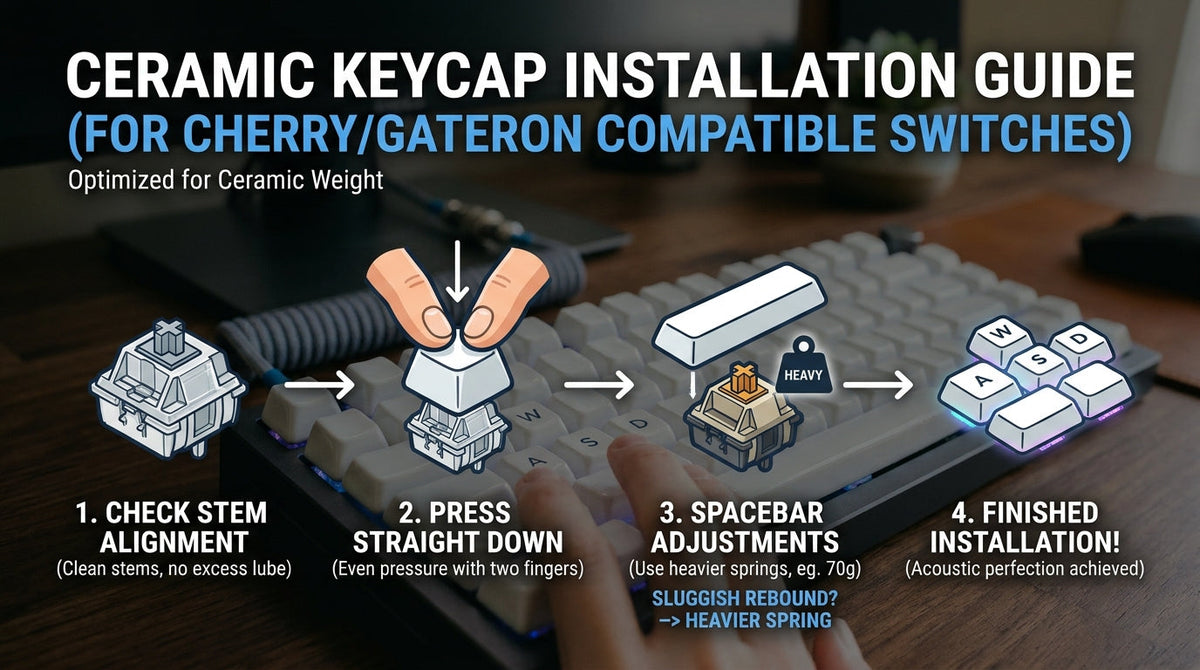
- Check Stem Alignment: Ensure your switch stems are clean and free from excess lubricant build-up.
- Press Straight Down: Place the keycap square on top of the switch stem and press down evenly with two fingers. Do not press at an angle.
- Spacebar Adjustments: If your spacebar feels sluggish, swap out the underlying switch spring for a heavier spring (67g–70g) or use a dedicated heavy switch just for the spacebar.
Frequently Asked Questions
Are ceramic keycaps fragile? Will they shatter if dropped?
Do ceramic keycaps work with North-Facing LEDs?
How do you clean ceramic keycaps?
Ready to Elevate Your Desk Setup?
- Browse Ceramic Keycap Sets — Available in Gloss, Matte, and Craze Glaze Finishes.
Frequently Asked Questions (FAQ)
Q1: Are ceramic keycaps fragile? Will they shatter if dropped?
Modern ceramic keycaps are made from industrial-grade alumina ceramic fired at high temperatures (over 1,100°C). Dropping a keycap onto a wooden desk or carpeted floor will not break it. However, if dropped from a high height directly onto a bare tile or concrete floor, there is a minor risk of chipping the glaze. Handle them with reasonable care during cleaning or switch swaps.
Q2: Do ceramic keycaps work with RGB lighting and North-Facing switches?
Yes! Ceramic keycaps come in both opaque and translucent/legend-shining variants. The glaze enhances RGB diffusion, giving your board a soft ambient glow. Additionally, high-quality ceramic sets feature redesigned internal stem clearance, avoiding interference with north-facing switch orientations on Cherry-profile caps.
Q3: How do you clean and maintain ceramic keycaps?
Cleaning ceramic keycaps is much easier than plastic sets. Because skin oils and finger grime cannot penetrate or etch into the ceramic glaze, you don't need harsh chemical bath cleansers. Simply wipe the keycaps with a damp microfiber cloth or a alcohol wipe to restore their factory gloss or silky matte texture.
Q4: Do I need to buy special switches for ceramic keycaps?
While you don't need proprietary switches, we strongly recommend using switches with a 50g or heavier bottom-out spring weight. Because ceramic caps are roughly three times heavier than PBT keycaps, ultra-light switches (like 35g–40g linear switches) might feel slightly sluggish on the upstroke rebound, especially on larger keys like the Spacebar, Enter, and Shift.
Q5: Will ceramic keycaps damage my switch stems?
No. High-quality ceramic keycaps feature precision-molded resin or aluminum inner stems (or carefully calibrated ceramic stems) designed to grip standard MX-style crosses without stretching or snapping the switch stem.

Để lại bình luận
Trang web này được bảo vệ bằng hCaptcha. Ngoài ra, cũng áp dụng Chính sách quyền riêng tư và Điều khoản dịch vụ của hCaptcha.