

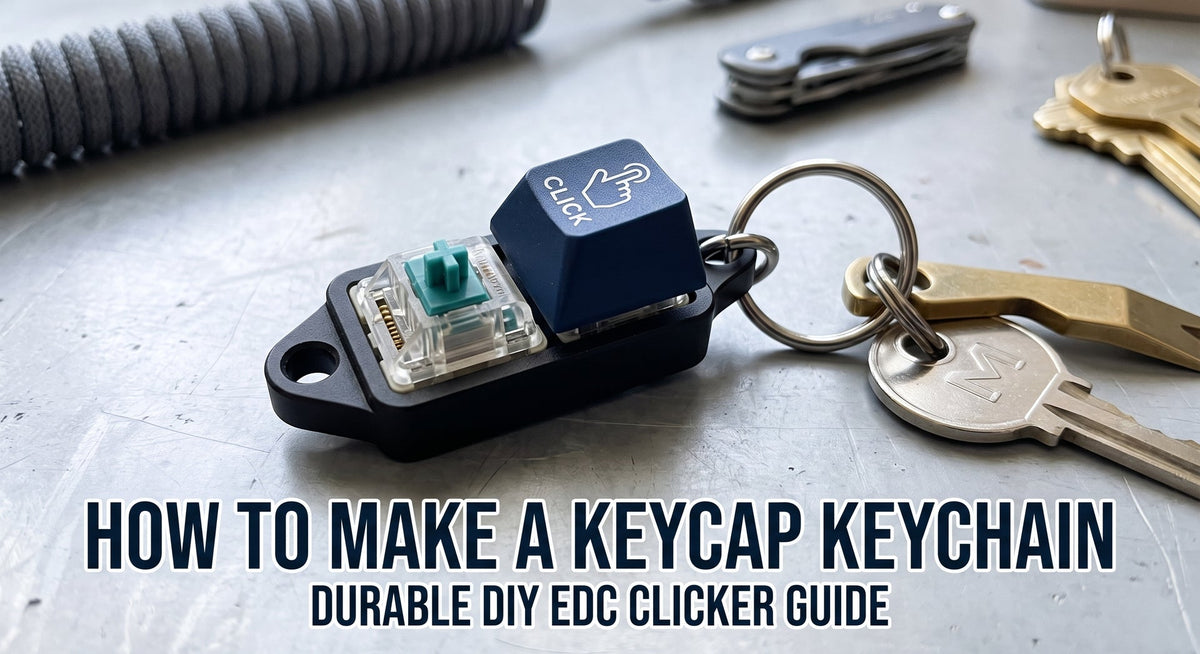
If you have a box of spare mechanical switches sitting in a drawer, turning one into an everyday carry (EDC) clicker keychain is one of the quickest 15-minute DIY projects you can do. It functions as a pocket fidget toy, tests new switch weights, and gives a dedicated home to that lone novelty artisan keycap that doesn’t match your primary desk board.
The biggest issue with most DIY keycap keychains is that they fall apart after two days in a pocket. Standard MX stems are designed for downward vertical pressure, not lateral shear force against car keys and denim seams.
This guide walks through building a keycap keychain that actually survives daily carry without losing your favorite cap.
Materials & Tools You’ll Need

- 1x Mechanical Keyboard Switch: Kailh Box White/Jade for maximum tactile click, or Gateron/Cherry tactile switches (like Browns/Pandas) for quieter office fidgeting.
- 1x Keycap: Thick PBT or novelty cap. (See profile recommendations below)
- 1x Keychain Switch Housing / Base: 3D printed (PETG/PLA), CNC aluminum single-switch housing, or acrylic switch tester plate.
- Keychain Hardware: 25mm split key ring, 8mm jump rings, and a mini carabiner or lobster clasp.
- Tools: Flush wire cutters, needle-nose pliers, and a small roll of PTFE thread seal tape (or plastic wrap).
- Optional: Multi-purpose adhesive (B-7000) or a micro 3V coin-cell LED switch base.
Step 1: Choose the Right Switch & Base Housing
Not all switch housings handle pocket drops equally. Standard 1.5mm acrylic plates crack easily if stepped on, whereas CNC aluminum or dense 3D-printed PETG holds up for years.
| Housing Material | Durability | Pocket Weight | Best Used For |
| CNC Aluminum | Maximum (Indestructible) | Heavy (~35g) | Heavy EDC, brass key setups |
| PETG / ABS (3D Print) | High (Impact resistant) | Light (~12g) | Budget builds, custom color matching |
| Cast Acrylic | Moderate (Brittle on drop) | Minimal (~8g) | Desk lanyards, visual switch display |
| PCB with Integrated LED | Moderate (Battery compartment) | Medium (~18g) | Novelty illuminated caps |
Switch Selection Tip: If you want a clean acoustic click, stick with Kailh Box switches. The sealed perimeter box design prevents lint, dust, and pocket debris from jamming the internal contact leaf.
Step 2: Mod the Switch Legs (Crucial Step)
Mechanical switches have two copper electrical pins and one central plastic stem on the bottom. Leaving these pins exposed will scratch your phone screen in your pocket.

- Take your flush cutters and clip both metal pins flat against the bottom switch housing.
- If your switch has two extra plastic PCB-mount stability legs (5-pin switch), clip those flush as well, leaving only the center cylinder.
- If using a standard hollow tester base, press the switch into the cutout until the side clips click securely into place.
Step 3: Attach the Split Ring Hardware
- Use needle-nose pliers to open your 8mm jump ring sideways (twist it open laterally rather than pulling it apart to maintain tension).
- Thread the jump ring through the mounting eyelet on your switch housing.
- Slide on the main split key ring and the lobster clasp, then twist the jump ring back until the cut ends meet flush.
Pro Tip: Never hang your switch directly from the main 25mm key ring. Adding an intermediate jump ring allows the switch to swivel freely, preventing the switch body from twisting out of its mount when your keys shift in your pocket.
Step 4: Secure the Keycap (The "Anti-Loss" Stem Trick)
Most lost keycaps happen when pulling keys out of tight pockets. Standard cross-stems can loosen over time under lateral stress.

To lock the keycap down without ruining it with permanent super glue:
- Cut a tiny 4mm x 4mm square of PTFE thread seal tape (or food-grade plastic cling wrap).
- Lay the film flat over the cross-stem of the mechanical switch.
- Press your keycap firmly onto the switch stem until fully seated.
The film compresses inside the cross-joint, adding high friction that withstands snagging while remaining 100% reversible whenever you want to swap caps.
Best Keycaps for Keychain Carry
Different keycap profiles and materials yield very different experiences on a keyring:
- OEM / Cherry Profile PBT: Ideal choice. Ergonomic, low profile, and resistant to finger oils. Check out our [[Keycap Profile & Sound Guide]] for stem compatibility details.
- Artisans & Novelties: Great for lanyard display, but avoid fragile resin caps with thin protruding horns or antennae on a pocket keyring.
- Ceramic Keycaps: Deliver a cool touch and a deep, low-pitched acoustic clack. For heavy EDC carry, pair them with aluminum bases rather than plastic to match the weight distribution. Explore compatible options in our Ceramic Keycap Keychain Collection.
Frequently Asked Questions
Can I make the keycap light up when clicked?
Yes. You can purchase pre-assembled keychain bases featuring a CR1220 coin-cell battery and a surface-mount LED directly underneath the switch plate. Transparent or semi-translucent switch housings (like Gateron Clear tops) allow light to diffuse evenly through back-lit keycaps.
Why is my keycap wobbly on the keychain?
Switch stems naturally exhibit a tiny amount of horizontal tolerance. If the wobble is excessive, the switch top housing might be unclipped, or the keycap stem is stretched. Swapping to a Kailh Box switch will immediately reduce lateral play due to its enclosed stem walls.
Will switch lubricant leak in my pocket?
If you lightly lubricate the switch stem rails with Krytox 205g0 for a smoother feel, it won't leak. Avoid liquid oils (like Super Lube oil or Krytox 105), which can seep out through the bottom housing pin holes into your pocket.
Upgrade Your EDC Setup
Building a single-switch keychain is the easiest way to give leftover switches a purpose and carry a tactile fidget toy wherever you go.
Got a favorite novelty switch or artisan cap you want to show off? Grab an aluminum housing base, fit your favorite profile cap, and add a durable click to your everyday carry.

Để lại bình luận
Trang web này được bảo vệ bằng hCaptcha. Ngoài ra, cũng áp dụng Chính sách quyền riêng tư và Điều khoản dịch vụ của hCaptcha.