


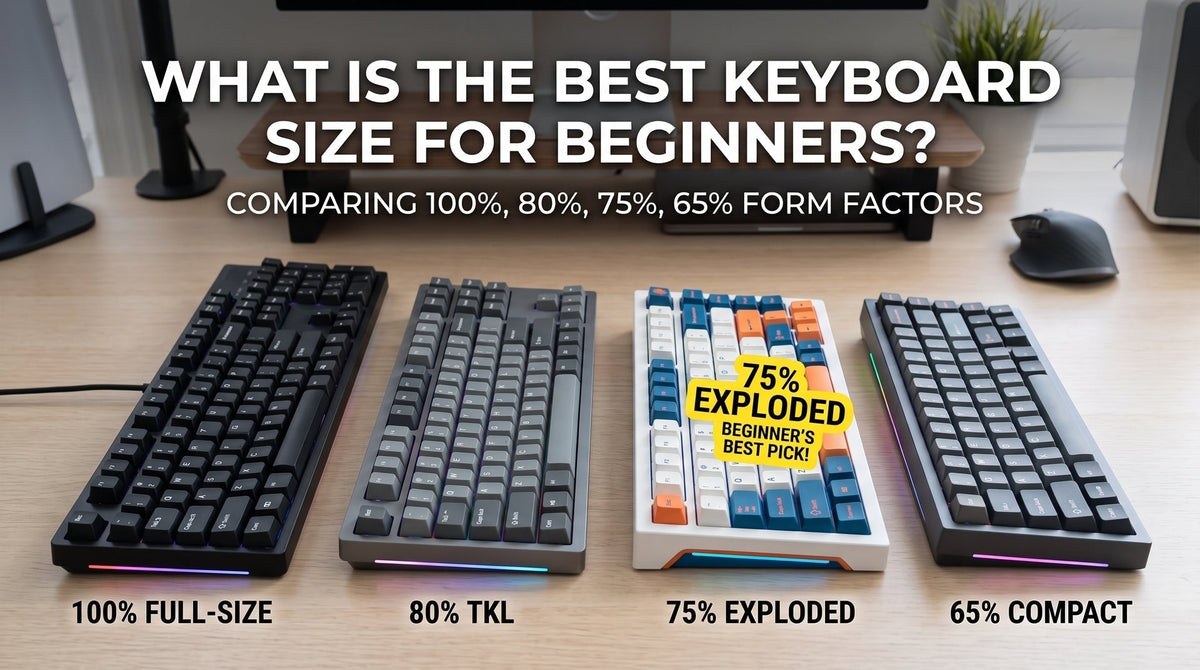
If you want the quick answer before getting into measurements and switch plates: Buy a 75% keyboard unless low-sensitivity competitive FPS gaming is your sole priority.
A 75% board gives you dedicated arrow keys, a full function row, and navigation keys while taking up barely two inches more desk width than a 60%. Going 60% strips away everything except the alphanumeric core—meaning every arrow press, volume adjustment, or F5 browser refresh requires holding down a
Fn modifier key.Here is an honest breakdown based on two years of switching back and forth between both form factors for daily typing, coding, and tactical shooters.

60% vs. 75%: Quick Specification Breakdown
| Feature | 60% Keyboard | 75% Keyboard |
| Typical Key Count | 61 keys | 80 – 84 keys |
| Dedicated Arrow Keys | ❌ No (Requires Fn layer or tap-dance) |
✅ Yes (Isolated cluster) |
| Function Row (F1–F12) | ❌ No (Mapped to numbers via Fn) |
✅ Yes (Top row intact) |
| Average Width | ~11.5 inches (29 cm) | ~12.6 – 13.2 inches (32–33.5 cm) |
| Mouse Sweeping Room | Maximum clearance (Ideal for FPS) | Excellent clearance (Only ~1.5" wider) |
| Learning Curve | High (Muscle memory for layers) | Zero (Plug and play) |
| Primary Sweet Spot | Low-sens gamers, extreme minimalists | All-round daily driving, writers, coders |
The Real Difference: Living on the "Function Layer"
On paper, dropping 20 keys sounds like a fair trade for a cleaner desk. In practice, the friction doesn't hit you while gaming—it hits you on a random Tuesday morning while editing a spreadsheet.

The 60% Reality Check
A 60% keyboard retains only the alphanumeric block, spacebar row, and basic modifiers. To highlight text in a document, you aren't just pressing
Shift + Right Arrow. You are pressing Shift + Fn + / (or Fn + L, depending on your firmware).- The Good: Your hands never leave the home row. Once layer navigation becomes muscle memory, you can fly through typing without extending your pinky.
-
The Annoying: The moment you open an Excel sheet, jump into a video editing timeline, or need to hit
Alt + F4, the cognitive load spikes. Some modern boards offer "tap arrows" (tapping Right Shift works as an arrow; holding it acts as Shift), but accidental misclicks still happen under pressure.
The 75% Compromise (The Best Kind)
A 75% keyboard packs the full functionality of an 87-key Tenkeyless (TKL) board into a compact footprint by eliminating dead space.
- You keep physical, dedicated arrow keys tucked neatly on the bottom-right.
- The F1–F12 row sits directly above numbers, preserving standard hotkeys in games like Dota 2 or developer tools in Chrome.
- You retain a vertical column of high-utility keys: usually
Delete,Page Up,Page Down, and occasionally a programmable rotary knob for instant volume control.
Gaming Performance: When Does Desk Space Truly Matter?
If you play tactical shooters like Valorant, CS2, or Apex Legends with an eDPI below 280, every centimeter of desk space directly impacts your aim consistency.
A 60% board frees up massive real estate. You can angle the board aggressively (the classic 45-degree tilt) without bumping the corner of your keyboard into your mousepad during wide, reactive flicks. For competitive setups paired with rapid-response switches—such as our Guide to Magnetic Switches and Rapid Trigger Technology—a 60% footprint remains the tournament standard for a reason.
However, if you play RPGs, MMOs, flight simulators, or strategy games that rely on hotkey binds across F-keys and navigation clusters, a 60% setup will constantly feel cramped. On a 75%, your mouse still gets roughly 4 to 5 inches more room than it would with a standard full-size keyboard, which is more than enough clearance for 95% of players.
Keycap & Customization Compatibility
Before buying, consider how much you plan to mod your board down the road.
- 60% is universal: Almost every custom keycap set in the world natively fits a 60% layout. The bottom row uses standard 1.25u keys, and the right Shift is standard 2.75u. Swapping to enthusiast materials like Custom Ceramic Keycap Setsis completely plug-and-play.
- 75% requires attention: Most 75% boards use a shortened 1.75u right Shift key and three 1u modifiers to the right of the spacebar. Ensure any aftermarket keycap set you purchase explicitly includes alternative modifier sizes.
Which One Should You Buy?
Pick a 60% Keyboard If:
- You play low-DPI first-person shooters and need maximum horizontal space for aggressive mouse swipes.
- Your desk is compact (under 36 inches / 90 cm wide) or you carry your keyboard daily in a backpack.
- You actively enjoy programming custom firmware (via VIA/QMK) and don't mind learning multi-key shortcuts for basic commands.
Pick a 75% Keyboard If:
- You use the same computer for work (spreadsheets, programming, writing) and evening gaming.
- You refuse to sacrifice dedicated arrow keys for text cursor manipulation.
- You want a compact, clean desk setup without spending two weeks retraining your fingers.
Ready to Upgrade Your Desk Setup?
Choosing between 60% and 75% comes down to function over form. If you aren't strictly chasing competitive mouse clearance, the 75% form factor delivers the ultimate balance of ergonomics, desk aesthetics, and zero-compromise productivity.
Browse our curated lineup of Premium 60% and 75% Mechanical Keyboards to find hot-swappable platforms, customized sound profiles, and premium keycap combinations built to last. Not sure which switch feel matches your typing style? Drop a comment below or reach out to our support team for a direct recommendation.

Để lại bình luận
Trang web này được bảo vệ bằng hCaptcha. Ngoài ra, cũng áp dụng Chính sách quyền riêng tư và Điều khoản dịch vụ của hCaptcha.