



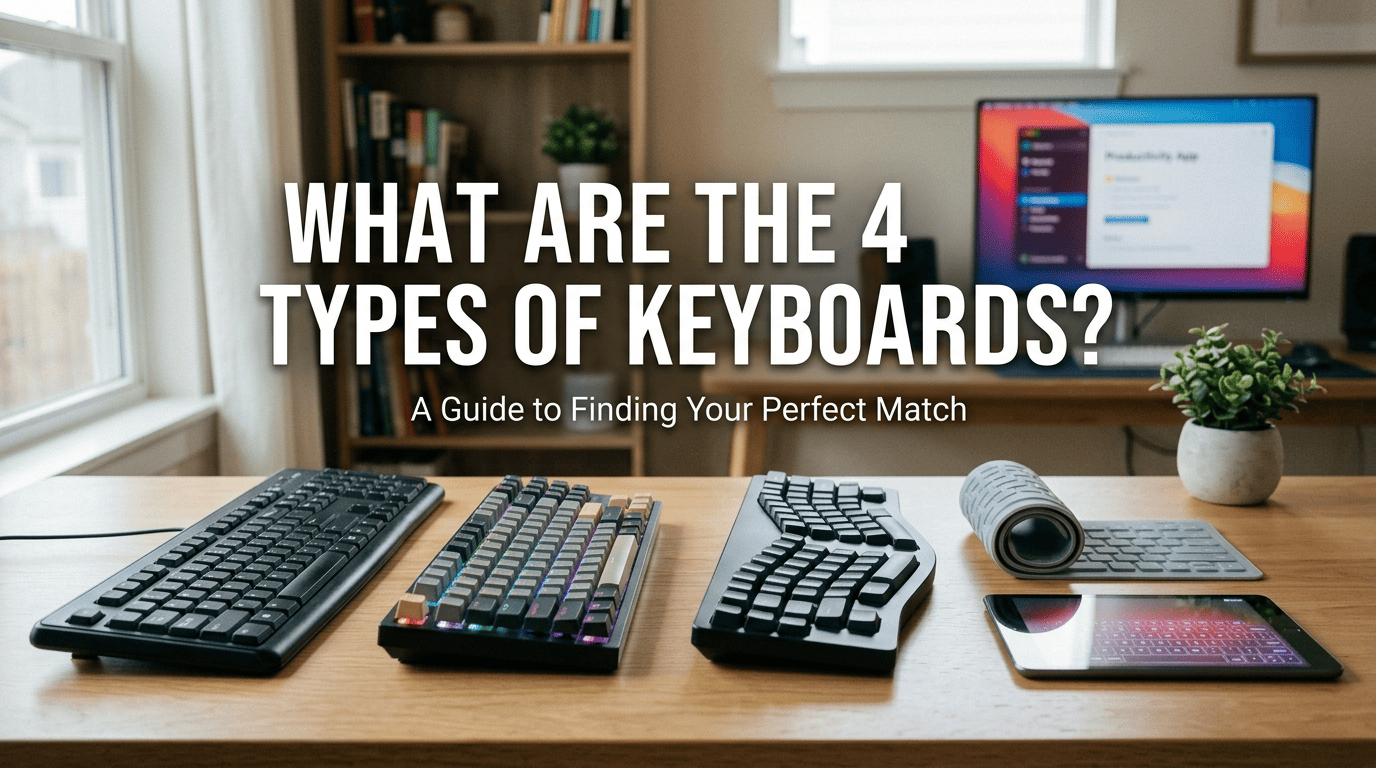
Whether you’re a professional coder, a casual gamer, or someone who spends eight hours a day churning out emails, your keyboard is your most vital tool. But walk into any tech store, and you're met with a confusing array of clicks, clacks, and glowing lights.
Choosing the wrong one isn't just a minor annoyance—it can lead to wrist fatigue and a significant drop in productivity. To help you navigate the market, we’ve broken down the four primary types of keyboards you need to know about in 2026.
1. Mechanical Keyboards: The Gold Standard for Feel
If you love a tactile, responsive experience, mechanical keyboards are the undisputed champions. Unlike cheaper alternatives, these use individual physical switches under every single key.
- Why people love them: They offer unparalleled feedback. You know exactly when a keypress has been registered. They are also incredibly durable, often rated for over 50 million keystrokes.
- The Customization Factor: This is where the "human" element comes in. From "clicky" blue switches to "silent" red ones, you can tailor the board to your exact typing style.
- Best For: Gamers, writers, and tech enthusiasts who want a premium, long-lasting tool.
2. Membrane Keyboards: The Quiet Everyday Hero
Most people are currently using a membrane keyboard without even knowing it. These work by pressing a key down onto a pressure-sensitive silicone or rubber layer, which then completes an electrical circuit.
- The Experience: They are much quieter and lighter than mechanical boards. While they lack that "crisp" feel, they are highly portable and budget-friendly.
- Modern Evolution: Today's high-end membrane keyboards are sleeker than ever, often featuring water-resistant designs—perfect for the coffee-spilling office worker.
- Best For: Open-plan offices, students, and budget-conscious buyers.
3. Ergonomic Keyboards: Your Wrists' Best Friend
Repetitive Strain Injury (RSI) is a real concern in our digital-first world. Ergonomic keyboards are designed to fit the natural posture of your body rather than forcing your hands to adapt to a flat board.
- Design Variations: You’ll see "split" designs (where the keyboard is literally in two pieces) or "angled" designs that mimic the natural resting V-shape of your arms.
- The Learning Curve: It takes a few days to get used to the layout, but your joints will thank you in five years.
- Best For: Heavy typists, data entry professionals, and anyone experiencing wrist or forearm discomfort.
4. Flexible & Virtual Keyboards: The Modern Nomads
As our "offices" shift to cafes and airplanes, the need for portability has birthed the flexible and virtual categories.
- Flexible Keyboards: Usually made of silicone, you can literally roll these up and stick them in your pocket. They are dust and water-resistant, making them great for industrial environments or travel.
- Virtual (Laser) Keyboards: These project an infrared keyboard onto any flat surface. While not ideal for writing a novel, they are the ultimate conversation starter and a lifesaver for quick mobile edits.
- Best For: Frequent travelers and tech-forward minimalists.
Which One Should You Choose?
Selecting a keyboard is a personal journey. Before you hit "Buy," ask yourself these three questions:
- Environment: Will my clicking annoy my coworkers? (If yes, go Membrane).
- Duration: Do I type for more than 4 hours a day? (If yes, prioritize Ergonomic or Mechanical).
- Portability: Do I work from a fixed desk or on the go?
Final Thoughts
A keyboard isn't just a peripheral; it’s the bridge between your thoughts and the digital screen. Don't settle for the "default" option that came with your PC. Invest in your touch, your speed, and your health.
Frequently Asked Questions (FAQ)
1. Which type of keyboard is best for programming?
Most developers swear by mechanical keyboards. The tactile feedback helps reduce typing errors (typos), and the durability means the board can handle millions of lines of code. Switches like Cherry MX Brown or Clear are popular because they offer a tactile "bump" without a loud click that might disturb your teammates.
2. Are mechanical keyboards actually better for gaming?
Yes, but with a caveat. Gamers prefer them because of N-key rollover (pressing multiple keys at once) and faster response times. If you play fast-paced FPS or MOBA games, look for "Linear" switches (like Red switches) for smooth, rapid-fire keystrokes. However, if you're a casual gamer, a high-quality membrane keyboard will still get the job done.
3. Can an ergonomic keyboard really stop wrist pain?
It can certainly help. Ergonomic keyboards are designed to prevent Ulnar Deviation—the unnatural outward bending of your wrists. By allowing your hands to stay in a "handshake" or neutral position, they reduce strain on the carpal tunnel. However, it's also important to pair your keyboard with a proper desk height and regular stretching.
4. Why are some keyboards so much more expensive than others?
Price usually reflects build quality and features. A $20 membrane keyboard uses cheap plastic and a single circuit board. A $150+ keyboard often features an aluminum frame, hot-swappable switches (allowing you to change them without soldering), PBT plastic keycaps that won't get "shiny" over time, and advanced RGB software.
5. How do I clean a mechanical vs. a membrane keyboard?
- Mechanical: You can pop the keycaps off with a puller and deep-clean the plate underneath. It’s much more hygienic in the long run.
- Membrane: These are harder to deep-clean because the keys usually don't come off easily. Your best bet is canned air and a damp (not dripping) microfiber cloth.


แสดงความคิดเห็น
เว็บไซต์นี้ได้รับการคุ้มครองโดย hCaptcha และมีการนำนโยบายความเป็นส่วนตัวของ hCaptcha และข้อกำหนดในการใช้บริการมาใช้